
About this pool — free & open source
This page is a live demo of the free, open-source solo Grin mining pool I built into the Grin Node Toolkit (Script 07). If you like it, you're welcome to point your miners here as a donation — there's no obligation.
With the Grin Node Toolkit you can stand up your own solo Grin pool in minutes with a single bash script. My intention is to let newcomers be independent from the big mining pools and keep Grin mining more decentralized — and since it's your own pool, you pay no fee to join anyone else's.
If you want more privacy, the pool can be protected with a username / password. The whole script is open source — audit, fork, clone or refactor it however you wish: github.com/noobvie/Grin-Node-Toolkit.
Point your miner here
This node runs Grin's built-in stratum server. Connect a Cuckatoo32 (C32) miner to it. There is no registration and no per-miner account — the block reward goes to the wallet configured on the node, not to your worker login. Your worker name is just a label so each rig shows up separately on the stats page.
Connection details — iPollo G1 Mini / G1
Open the miner's web panel in a browser (its IP on your LAN), log in, then go to Miners → Pool Configuration. The G1 takes up to three pools and uses them in order — set Pool 1 to this solo pool, and point Pool 2 / Pool 3 at public pools so the rig keeps earning if your node goes offline.
Pool 1 — this solo pool primary
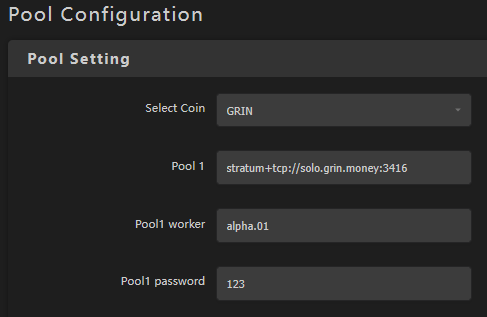
- Option A · IP recommended — the node's raw public IP. Stratum is plain TCP straight to the node (never proxied), so the IP is always the most reliable target. Use this unless you have a specific reason not to.
- Option B · domain optional — a friendlier alias, handy if the node's IP ever changes. It only works when the domain's A record points straight at the node's public IP. If it shows 🔴 unreachable (or ⚠ Cloudflare?), fall back to the IP.
stratum+tcp://… URL.
Pool 2 / Pool 3 — public backups failover
nickname.NN. Pick a nickname for yourself
(e.g. alpha) and a two-digit number per rig:
alpha.01, alpha.02, … alpha.NN.
Each unique worker name shows as its own row on the stats page, so number every
machine differently if you want to tell them apart.
nickname.NN) and the
password is whatever that pool asks for — grab the exact stratum URL, port, and worker
format from each pool's own getting-started page. Pool 1's password is ignored.
Save the config and reboot the miner if possible. It reconnects to Pool 1 within a few seconds — confirm under CGMiner Status that the pool shows as Alive and shares are accepted.
GPU miners
to be defined
Set a GPU rig up the same way as the iPollo above — point it at the
same Pool URL, with worker nickname.NN and any password. The
creator hasn't tested GPU mining (Cuckatoo32) against this node, though, so no verified
miner flags are published here — treat it as unverified until this section is filled in.
Verify it's working
- On the stats page, the Wallet Listener tile should read listening — the node needs the wallet up to build coinbase rewards.
- Once your miner connects and submits a share, Active Miners ticks up and your
worker (e.g.
alpha.01) appears in the Miners table with a 15m hashrate. - On the server, the node log shows
Got share at height …per accepted share, andSolution Found for block …when you mine a block.
file_log_level is probably not INFO. Shares are logged at INFO;
set file_log_level = "INFO" in grin-server.toml and restart the node.
(Found blocks still record regardless — those log at WARN.)
file_log_level issue above — not failover.)
Server-side checklist
- Firewall: the stratum port (shown above) must be open to your miners — it's raw TCP, not proxied through nginx/HTTPS.
- Bind address: for miners on other machines,
stratum_server_addringrin-server.tomlmust bind0.0.0.0:<port>(or the server's IP), not127.0.0.1. - Wallet listener: the wallet at
wallet_listener_urlmust be running so the node can build coinbase outputs for blocks you solve.
High availability — keep mining during node maintenance
⚠ to be tested
Solo mining stops the instant your node does — so rebooting the box or patching the OS means lost hashing time unless something picks up the slack. Two ways to cover that gap, easiest first.
Easiest — fail over to a public pool (already set up above)
This needs no extra servers: Pool 2 / Pool 3 in the setup above already point at gaeapool.com and grin.2miners.com. When your node goes down the G1 falls through to them within seconds and keeps earning — paid to your own GRIN address. The only downside is you're not solo while the node is offline. For most people this is enough.
Advanced — a second solo node (true HA)
To stay solo through a reboot, run a second grin node and let the miner fail over between the two. The G1 has three pool slots tried in order, so the natural mapping is two of your own nodes first, then a public pool as last resort:
The whole trick is that both nodes pay the same wallet, so it doesn't matter which one solves the block — the reward lands in the same place. Reboot node-A and the rig keeps mining solo on node-B; only when both are down does it drop to the public Pool 3.
The three links to wire up
1. Each node — grin-server.toml (identical on node-A and node-B):
grin-wallet -p <pass> owner_api with owner_api_include_foreign = true,
so build_coinbase is served on the Owner port 3420 — not the old standalone
Foreign listener on 3415. On a single box this is all localhost and needs nothing extra. For this
remote two-node layout, the wallet must accept off-box connections, which means setting
owner_api_listen_interface = "0.0.0.0" in grin-wallet.toml — and because
the Owner API (send/spend) shares that port, keep the wallet server and mining nodes on a
trusted private network or a WireGuard/SSH tunnel; never expose 3420 to the public internet.
2. Wallet server — grin-wallet.toml:
check_node_api_http_addr is a
single value — it won't rotate to a second node on its own. That's why the wallet points
at a co-located local node instead of the remote mining nodes: that local node stays up
regardless of which mining node you're rebooting. (The alternative — a single hostname over a
health-checked TCP load balancer like nginx-stream/HAProxy in front of both nodes' 3413
— also works but adds more moving parts.)
3. iPollo — Pool Configuration:
sync_status is no_sync via the node Owner API
(get_status) before trusting node-B. Only one node needs to be up at a time
for mining to continue.
Additional info
How the stats update
- Live node + wallet metrics refresh every 120 s (two Grin blocks) on the stats page.
- Blocks found and per-miner hashrate are parsed from the node log by the collector.
- Coinbase rewards mature after 1440 blocks (~24 h) before they're spendable.
file_log_level = "INFO" on the node — shares are
logged at INFO. Set it in grin-server.toml and restart the node.
(Found blocks record regardless — those log at WARN.)
Harmless wallet-log errors you can ignore
The wallet log may repeat lines like these:
3413 (wallet → node). Solo mining does
not use that direction to receive payment: your block rewards land because the
node calls the wallet listener on port 3420 (build_coinbase, a
local operation on the combined owner_api listener) — that path is independent of the
failing probe. So coinbase keeps arriving even while these errors repeat.
It only affects on-demand balance refresh and spending; if you later want
those, make sure the node is running and reachable on 127.0.0.1:3413.
External pollers
Pool stats are also published as a machine-readable JSON feed for external tools and dashboards. Copy the endpoint:
data/poolstats_main.jsonThe feed is refreshed by the collector and carries both pool and network figures:
- pool —
name,hashrate(+hashrate_unit, gps),workers,miners,fee,blocks_24h,last_block(height + timestamp) - network —
height,difficulty,hashrate_gps,connections - ts — ISO timestamp of the snapshot, and
net(mainnet/testnet)
data/poolstats_test.json.